incandescent lamps 白熾燈filament 燈絲tungsten 鎢 halogen 鹵素iodine 碘Xenone lamps 氙燈fluorescent lamps 熒光燈argon 氬Front light: It is oftern refered to as incident light and the light that falls onto the object.Back light: It is also called transmitted light, especially if images of transparant objects are acquired.Dark-field illumination: The light is placed in such a way that most of the light is reflected away from the camera, and only light of certain parts of the object is reflected to the camera.
- May 02 Mon 2016 11:40
-
Light sources
- Apr 11 Mon 2016 14:32
-
C++如何載入一個純文字的資料(*.txt)至一個陣列資料格式?

下載 Boost C++ Libraries 依照你的Visual Studio 選擇適合的版本boost_1_60_0-msvc-14.0-64.exe
boost_1_60_0-msvc-12.0-64.exe
boost_1_60_0-msvc-11.0-64.exe
boost_1_60_0-msvc-10.0-64.exe
- Apr 11 Mon 2016 01:53
-
安裝GX Works2 version 1.501x

- Apr 08 Fri 2016 09:58
-
Basler CCD雙攝影機控制硬體索引順序
問題描述:雙攝影機在使用上, 由於每次抓到裝置索引順序的不同,有可能這一次先抓到cam1, 下次可能先抓到cam2, 因此得想個辦法讓每次抓到的順序一致, 可依照使用者需求來定義先後順序------------------------------------------------------解決方法:
const uint NUM_DEVICES = 2; // 裝置數量
m_deviceID = new string[NUM_DEVICES]; //實際硬體抓到裝置ID
m_deviceIDUser = new string[NUM_DEVICES]; // 使用者定義裝置ID(由ini檔案載入更新)
- Apr 06 Wed 2016 07:38
-
OpenCV meanStdDev
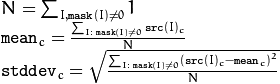
meanStdDev[1]Calculates a mean and standard deviation of array elements. C++: void meanStdDev(InputArray src, OutputArray mean, OutputArray stddev, InputArray mask=noArray()) Python: cv2.meanStdDev(src[, mean[, stddev[, mask]]]) → mean, stddev
- Apr 01 Fri 2016 09:38
-
Face / Object Detection

1. Haar Feature Selection
2. Creating an Integral Image
3. Adaboost Training
4. Cascading Classifiers
- Mar 31 Thu 2016 11:02
-
Microsoft Cognitive Services 微軟認知服務API

Microsoft 推出許多認知服務相關的API, 這些API工具包含影像處理, 語音辨識, 人工智慧, …可以廣泛應用在各專業領域, 有興趣的人可以去聲請測試, 一窺究竟…https://www.microsoft.com/cognitive-services/----------------------------------------------------------------------------------------------------------------------------------------------
- Mar 30 Wed 2016 11:28
-
HSV顏色範圍內的遮罩應用
請先參考下面這一篇, 篩選RGB得到顏色範圍內的遮罩
RGB顏色範圍內的遮罩應用 Part II
----------------------------------------------------
先來認識inRange函式定義
inRange
Checks if array elements lie between the elements of two other arrays.
- C++: void inRange(InputArray src, InputArray lowerb, InputArray upperb, OutputArray dst)
- Python: cv2.inRange(src, lowerb, upperb[, dst]) → dst
- C: void cvInRange(const CvArr* src, const CvArr* lower, const CvArr* upper, CvArr* dst)
- C: void cvInRangeS(const CvArr* src, CvScalar lower, CvScalar upper, CvArr* dst)
- Python: cv.InRange(src, lower, upper, dst) → None
- Python: cv.InRangeS(src, lower, upper, dst) → None
Parameters:
- src – first input array.
- lowerb – inclusive lower boundary array or a scalar.
- upperb – inclusive upper boundary array or a scalar.
- dst – output array of the same size as src and CV_8U type.
- src – first input array.
The function checks the range as follows:
For every element of a single-channel input array:

For two-channel arrays:

and so forth.
That is, dst (I) is set to 255 (all 1 -bits) if src (I) is within the specified 1D, 2D, 3D, ... box and 0 otherwise.
When the lower and/or upper boundary parameters are scalars, the indexes (I) at lowerb and upperb in the above formulas should be omitted.
----------------------------------------------------
void ImgProc::RGB2HSV(){Mat dst = RGB2HSV(m_src);
namedWindow("HSV", CV_WINDOW_NORMAL); cv::imshow("HSV", dst);}
Mat ImgProc::RGB2HSV(const Mat& src){assert(src.type() == CV_8UC3);
Mat dst;
cv::cvtColor(src, dst, CV_BGR2HSV);
return dst;}
- Mar 30 Wed 2016 00:48
-
RGB顏色範圍內的遮罩應用 Part II

請先參考下面這一篇, 建立所需的編譯環境RGB顏色範圍內的遮罩應用 Part I: Visual Studio 2013編譯環境建構-------------------------------------------------------1. 先建立一個可以接收C# UI丟過來的影像檔案的路徑名稱 imread(filename)2. 利用imshow()顯示影像新增一個header file滑鼠點選Header File(.h)輸入檔名: colorInRange.hGeneral->Common Language Runtime Support
- Mar 29 Tue 2016 00:24
-
RGB顏色範圍內的遮罩應用 Part I: Visual Studio 2013編譯環境建構

首先, 先下載安裝OpenCV2.4.10, 安裝方式請參考下面這篇:Quick Installation for OpenCV 2.4.10 with Visual Studio 2013版本: Visual Studio 2013 and OpenCV 2.4.10 準備建立四種不同屬性管理員專案, 可以方便以後使用OpenCV2.4.10直接下載使用, 免除重複設定include & library環境1. VS2013OpenCV2410X86Release2. VS2013OpenCV2410X86Debug
- Mar 28 Mon 2016 07:58
-
Quick Installation for OpenCV 2.4.10 with Visual Studio 2013

- Mar 27 Sun 2016 16:50
-
安裝GLUT - The OpenGL Utility Toolkit

到官網下載下載後解壓縮至任何你喜歡的資料夾, 以我筆電為例E:\GLUT\glutdlls37beta先設定專案環境<環境變數>設定, 在Path變數加入GLUT安裝路徑(DLL目錄)如果懶得加入系統變數,則是將E:\GLUT\glutdlls37beta\glut32.dll複製一份至Debug資料夾下就可以正常執行…
