image
專案名稱: EmguGPUExCUDA版本: cuda7.5.18 windows.exe for win7Emgu CV版本: emgucv-windows-universal-cuda 3.0.0.2158如果CUDA版本太舊,會顯示錯誤提示:windows cuda driver version is insufficient for cuda run time version解決方案, 升級到新的版本private void getCudeDeviceInfo()
{
CudaDeviceInfo cdi = new CudaDeviceInfo();
label2.Text = cdi.IsCompatible.ToString();
label4.Text = cdi.MultiProcessorCount.ToString();
label5.Text = cdi.Name;
label7.Text = cdi.TotalMemory.ToString();
}

me1237guy 發表在 痞客邦 留言(4) 人氣()

image
專案名稱:MatStructureEx
using Emgu.CV;
using Emgu.CV.Structure;
using Emgu.CV.CvEnum;
using System.Runtime.InteropServices;
using System.Diagnostics;
using Emgu.CV.Util;

me1237guy 發表在 痞客邦 留言(4) 人氣()

image
專案名稱: EmguMorphologyEx加入參考C:\Emgu\emgucv-windows-universal-cuda 3.0.0.2158\binEmgu.Util.dll Emgu.CV.dll Emgu.CV.UI.dllGetStructuringElementReturns a structing element of the specified size and shape for morpholigical operationsParameters shapeType: Emgu.CV.CvEnum.ElementShape
Element shape
ksizeType: System.Drawing.Size
Size of the structuring element.
anchorType: System.Drawing.Point
Anchor position within the element. The value (-1, -1) means that the anchor is at the center. Note that only the shape of a cross-shaped element depends on the anchor position. In other cases the anchor just regulates how much the result of the morphological operation is shifted.===============================================

me1237guy 發表在 痞客邦 留言(0) 人氣()

image
專案名稱: SpeedUpPixelAcessMask: 通常為一張黑白圖片,也就是二值化圖片,用來擷取感興趣的物件(如膚色偵測)或是圖形去背利用這些黑白的圖片跟原始圖片做對應,白色255的部份為顯示出來的區域,黑色為0的部份為不顯示出來的區域,讀入一張彩色影像img1讀入一張遮罩影像mask將img1套用遮罩mask, 可以得到結果影像img2其中來源影像和遮罩影像大小必須一樣

me1237guy 發表在 痞客邦 留言(0) 人氣()

image
How to go through each and every pixel of an image efficiently? 專案名稱: SpeedUpPixelAcessUnmaged code:第一種方式: MIplImage(1) MIplImage: managed structure equivalent to IplImage利用Marshal.PtrToStructure指向來源影像指標img.Ptr, 資料結構型態為 MIplImage, 記得前面強迫轉型(MIplImage)(2) IntPtr intPtr = mImg.ImageData;
C#利用IntPtr指標型態指向 ImageData: 存放影像像素資料起始位置

me1237guy 發表在 痞客邦 留言(2) 人氣()


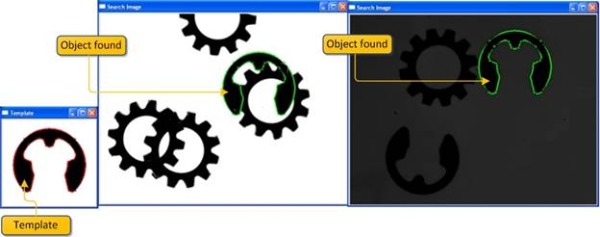
最近在研究這篇Edge Based Template Matching, 以下為研究心得筆記原作者提供C++版本的實作(OpenCV 2.0 and Visual studio 2008 ), 搭配數學公式說明, 讓人很容易理解
    這個方法(Feature based approach)相較於傳統(Gray value based approach)強健許多,
      尤其當搜尋物件非完整顯示時,可以準確搜. 但計算量超大, 不適合大張圖像樣板比對
      目前我已經成功改寫成C# Emgu CV版本, 之後考慮改以GPU版本加速, 以利實際應用
下面三張圖簡單說明本範例應用情形: 第一張圖(左下角)為template image(樣板影像)

me1237guy 發表在 痞客邦 留言(2) 人氣()

image
MATLAB: peaks指令VTK上視圖VTK 3Dzoom in參考資料:VTK/Examples/CSharp/Meshes/Color a mesh by height

me1237guy 發表在 痞客邦 留言(0) 人氣()

image
private Kitware.VTK.RenderWindowControl renderWindowControl1;
vtkAxesActor axes = null;
List<vtkActor> vtkActors = new List<vtkActor>();
public Form1()
{
InitializeComponent();
renderWindowControl1 = new RenderWindowControl();
splitContainer1.Panel2.Controls.Add(renderWindowControl1);
renderWindowControl1.Show();
renderWindowControl1.Dock = DockStyle.Fill;
}

me1237guy 發表在 痞客邦 留言(0) 人氣()

image
加入參考Kitware.mummy.Runtime.dll和Kitware.VTK.dllpublic partial class Form1 : Form
{
private Kitware.VTK.RenderWindowControl renderWindowControl1;
List<vtkActor> vtkActors = new List<vtkActor>();
public Form1()
{
InitializeComponent();
renderWindowControl1 = new RenderWindowControl();
splitContainer1.Panel2.Controls.Add(renderWindowControl1);
renderWindowControl1.Show();
renderWindowControl1.Dock = DockStyle.Fill;
}

me1237guy 發表在 痞客邦 留言(0) 人氣()

image
Add references: Kitware.mymmy.Runtime.dll and KitwareVTK.dll==============================================using System;
using System.Collections.Generic;
using System.ComponentModel;
using System.Data;
using System.Drawing;
using System.Linq;
using System.Text;
using System.Windows.Forms;
using Kitware.VTK;
namespace SimplePointsReader
{
public partial class Form1 : Form
{
private Kitware.VTK.RenderWindowControl renderWindowControl1;
public Form1()
{
InitializeComponent();
renderWindowControl1 = new RenderWindowControl();
this.Controls.Add(renderWindowControl1);
renderWindowControl1.Show();
renderWindowControl1.Dock = DockStyle.Fill;
}

me1237guy 發表在 痞客邦 留言(0) 人氣()

image
p0離紅色線段最近的點,即本身所在位置(1,0,0), 所以距離平方為0p1離紅色線段最近的點(1, 0, 0), 距離平方為4// DistancePointToLine.cpp : 定義主控台應用程式的進入點。
//
#include "stdafx.h"
#include <vtkSmartPointer.h>
#include <vtkLine.h>
#include <vtkPoints.h>
int _tmain(int argc, _TCHAR* argv[])
{
double lineP0[3] = {0.0, 0.0, 0.0};
double lineP1[3] = {1.0, 0.0, 0.0};
double p0[3] = {1.0, 0, 0};
double p1[3] ={ 1.0, 2.0, 0};
/*
vtkSmartPointer<vtkLine> line =
vtkSmartPointer<vtkLine>::New();
line->GetPoints()->SetPoint(0, lineP0);
line->GetPoints()->SetPoint(0, lineP1);
*/
{
double dist0 = vtkLine::DistanceToLine(p0, lineP0, lineP1);
std::cout << "Dist0: " << dist0 << std::endl;
double dist1 = vtkLine::DistanceToLine(p1, lineP0, lineP1);
std::cout << "Dist1: " << dist1 << std::endl;
}
{
double t;
double closest[3];
double dist0 = vtkLine::DistanceToLine(p0, lineP0, lineP1, t, closest);
std::cout << "Dist0: " << dist0 << " closest point: " << closest[0] << " " << closest[1] << " " << closest[2] << std::endl;
double dist1 = vtkLine::DistanceToLine(p1, lineP0, lineP1, t, closest);
std::cout << "Dist1: " << dist1 << " closest point: " << closest[0] << " " << closest[1] << " " << closest[2] << std::endl;
}
char c;
std::cin >> c;
return 0;
}

me1237guy 發表在 痞客邦 留言(0) 人氣()

image
同步兩個執行緒, 當Counter1++完成, 換Counter2++, 利用AutoResetEvent機制交換控制權由於同步的關係, 儘管兩組計數器跳動很快, 但下列條件成立 |Counter1 -Counter2| <= 1public class Worker
{
int m_cnt1 = 0, m_cnt2 = 0;
Thread m_thread1;
Thread m_thread2;
TextBox m_textBox1, m_textBox2;
readonly AutoResetEvent m_syncEvent1 = new AutoResetEvent(false);
readonly AutoResetEvent m_syncEvent2 = new AutoResetEvent(true);
ManualResetEvent m_pauseEvent = new ManualResetEvent(true);
ManualResetEvent m_shutdownEvent = new ManualResetEvent(false);
void Job1()
{
while (true)
{
m_pauseEvent.WaitOne(Timeout.Infinite);
if (m_shutdownEvent.WaitOne(0))
break;
m_syncEvent2.WaitOne();
m_cnt1++;
m_textBox1.BeginInvoke((MethodInvoker)delegate {
m_textBox1.Text = m_cnt1.ToString();
});
Thread.Sleep(1);
m_syncEvent1.Set();
}
}
void Job2()
{
while (true)
{
m_pauseEvent.WaitOne(Timeout.Infinite);
if (m_shutdownEvent.WaitOne(0))
break;
m_syncEvent1.WaitOne();
m_cnt2++;
m_textBox2.BeginInvoke((MethodInvoker)delegate
{
m_textBox2.Text = m_cnt2.ToString();
});
Thread.Sleep(1);
m_syncEvent2.Set();
}
}
public Worker() { }
public Worker(TextBox textBox1, TextBox textBox2)
{
m_textBox1 = textBox1;
m_textBox2 = textBox2;
}
public void Start()
{
m_thread1 = new Thread(new ThreadStart(Job1));
m_thread2 = new Thread(new ThreadStart(Job2));
m_thread1.Start();
m_thread2.Start();
}
public void Pause()
{
m_pauseEvent.Reset();
}
public void Resume()
{
m_pauseEvent.Set();
}
public void Stop()
{
m_shutdownEvent.Set();
m_pauseEvent.Set();
m_thread1.Join();
m_thread2.Join();
m_thread1 = null;
m_thread2 = null;
}
}

me1237guy 發表在 痞客邦 留言(0) 人氣()

Blog Stats
⚠️

成人內容提醒

本部落格內容僅限年滿十八歲者瀏覽。
若您未滿十八歲,請立即離開。

已滿十八歲者,亦請勿將內容提供給未成年人士。